Instructions
1.Overview
With the integration of 8350 DC resistance test and demagnetization function, the instrument supports parameter setting and testing of every testing items individually by choosing corresponding menus, so it’s easy and convenient to use.
The below shows a commonly used icon:
Go back to last interface
2. Instructions On Printer
The printer’s button and its indicator light are integrated. After the printer is powered on, the indicator light will be on all the time under normal conditions and it’ll flash when printing paper is used up. Press button once and paper will be fed.
Changing Printing paper:
Pull out rotating handle and open cover. Load printing paper and pull out the paper a little (outside tearing teeth a little). Ensure that the paper is put neatly and the side with chemical (the smooth side) is upward. Close the cover. After the paper is held tightly by shaft, push the shaft into print head and push in the rotating handle to restore the original state.
3. Connecting Test Wires
Connect high voltage terminals with A, B, C and O bushing of the high voltage side of the tested product by test wires (the longer ones), that is, the yellow, green, red and black clamps. (hang the black clamp in the air if no neutral O bushing); Connect low voltage terminals with a, b, c and o bushing of the low voltage side of the tested product by test wires (the shorter ones), that is, the yellow, green, red and black clamps. (hang the black clamp in the air if no neutral O bushing)
4. Instructions On Menu
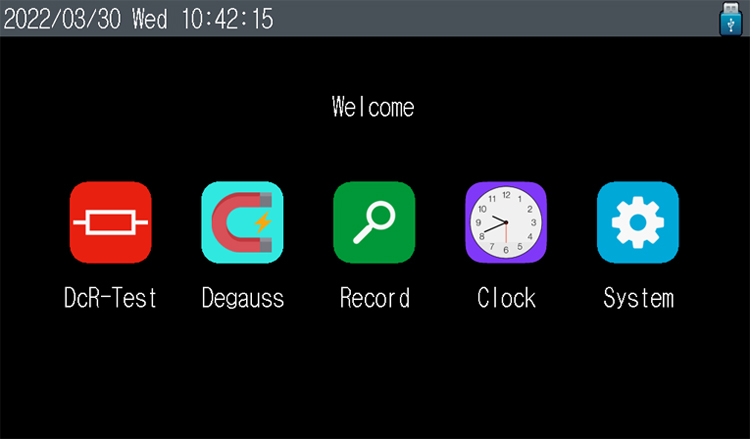
After all test wires are connected, turn on the tester. The tester is initialized and goes to "main menu" interface, as shown below.
Here, time and some status indicators are displayed on top bar. Tester specification, manufacturer information and some function options are displayed in middle. Click corresponding function option to enter its menu.
Precautions
For testing winding of no-load regulating transformers, don’t switch off no-load tap changer during tests or power discharging.
Don’t disconnect test wires and cut off power switch during tests or power discharging.
During transformer tests, winding of the non-test side must be in open circuit.


